Workday is UVA’s Human Resources platform for most HR activities.
This page provides Workday announcements and links to training resources to help you use the system. If you have questions or need additional support, contact AskHR to connect with an HR team member.
Latest Workday News and Updates
Workday User Interface Updates
Workday is introducing several user interface updates designed to create a more modern experience and make it easier to navigate, find information, and access common actions.
Beginning Saturday, September 19, UVA Workday users will see updates to three primary areas: navigation, the Home page, and Worker Profile.
While Workday will look different in several places, most of the processes and tasks you use today are not changing. These updates primarily affect how you navigate Workday and how information is organized and presented.
A New Navigation Experience
Workday’s navigation menu is being updated to provide quicker access to the applications and worklets you use.
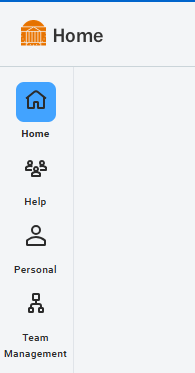
The navigation menu will now be docked along the side of the screen by default. You can access items within a category by hovering over the category and selecting the appropriate worklet, reducing the number of clicks needed to navigate Workday.
You can also personalize the navigation menu. From your navigation settings, you can:
Undock the menu if you prefer the previous behavior.
Reorganize your categories.
Pin frequently used worklets for quicker access.
These preferences allow you to organize Workday navigation in the way that works best for you.
New docked navigation menu
The menu remains available along the left side of the screen for quicker access to Workday categories and worklets.
An Updated Workday Home Page
The Workday Home page is receiving a fresh look, with important information and actions organized to help you more quickly understand what may need your attention.
To Do and Updates
Workday’s Timely Suggestions and Recommended for You experiences are being consolidated into a new To Do and Updates card.
To Do highlights timely actions and suggestions that may require your attention.
Updates provides relevant information for you or, when applicable, your team.
The information you see will depend on your role and what is happening in Workday.
Home Page Cards
You may also notice new or updated cards on your Home page.
Home page cards provide quick access to information and actions relevant to your role. The cards available to you will vary based on your responsibilities in Workday.
Examples may include announcements, time entries, hiring and staffing information, or other areas of Workday.
The existing My Team Highlights card will also become the My Team card.
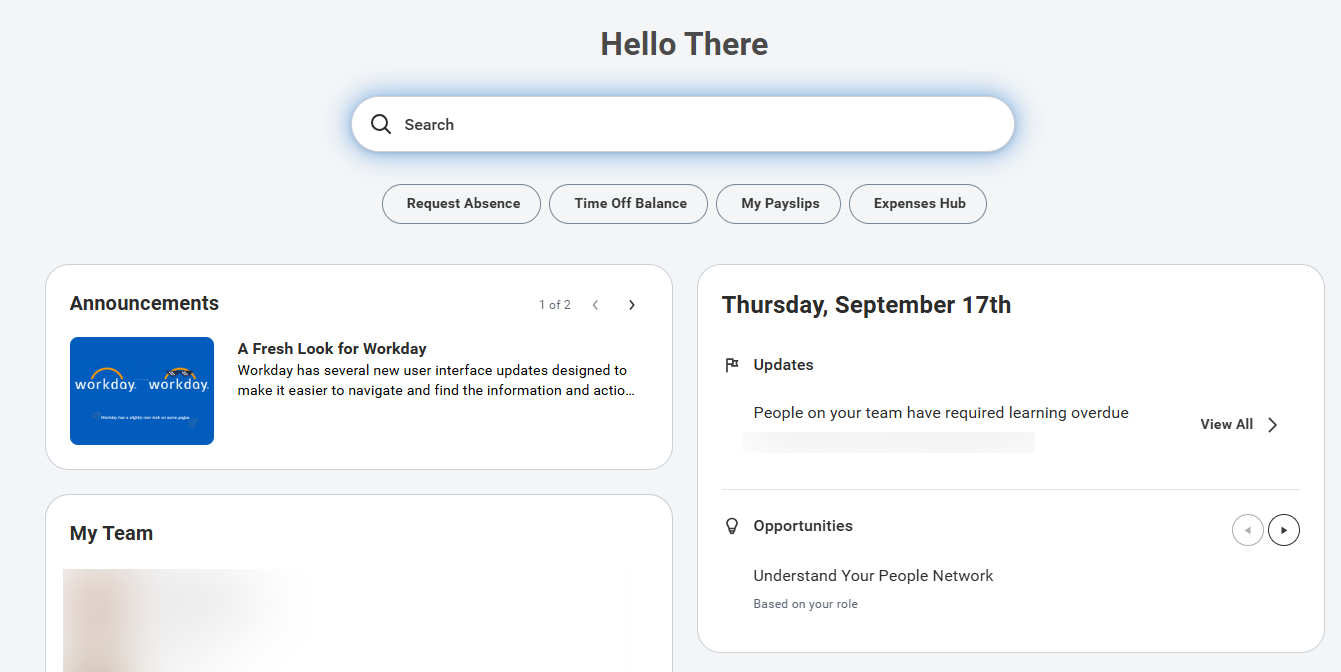
Please note: The image below may show cards that do not appear on your Home page. Available cards vary based on your role and responsibilities in Workday.
Updated Workday Home page
Search, quick-access buttons, announcements, and role-based cards are brought together in the refreshed Home page experience.
A Modernized Worker Profile
Worker Profile is receiving a fresh design that changes how information about you and other workers is organized and displayed.
One of the most noticeable changes is an updated Summary experience.
When viewing the Summary page of your own Worker Profile, information will be organized into Public and Private areas to make it clearer which information is generally available to others and which information is specific to you.
Only you will see the Private tab on your Worker Profile.
The updated design is intended to make Worker Profile easier to understand and navigate while maintaining access to the information you are accustomed to finding there.
Modernized Worker Profile
The updated Summary view separates information into Private and Public areas and organizes key information into easier-to-scan cards.
Change Job update for role assignment review
Managers, when employees are changing positions, managers will be given tasks to review the roles of the current and future positions. Roles are position-based assignments and are not assigned to a specific user, therefore the review steps will allow managers to evaluate these assignments at the time a position changes.
What Do You Need to Do?
The updates take effect on Saturday, September 19. You can continue using Workday as usual. Your existing Workday access and business processes are not changing because of these interface updates.
After the update, we recommend taking a few minutes to explore the new navigation menu and Home page. You may also want to personalize your navigation by reorganizing categories or pinning the Workday items you use most often.
March 16: 2026 Workday Release 1 has occurred affecting some reporting and internal processes. If you have any trouble navigating a change in the system, you can utilize Workday Assist or contact askhr@virginia.edu

 UVA_HR